
Wanna learn how to start a food blog? Well, you’ve come to the right place!
If baking or cooking is your passion, a food blog is a powerful way to share your recipes, ideas and culinary journey with the world. A blog lets you showcase your creations, connect with like-minded people, build a brand, and even create an income stream if you decide to grow it professionally.
Food blogs dominate visual platforms like Pinterest, where recipe content consistently ranks among the most popular pins. I’ve loved baking since childhood and relied on food blogs for many of my favourite recipes. In 2015 I launched my business, Queenslee Appétit, and set a goal to build a food blog. After a year of planning and learning, I finally launched and learned a lot along the way. I’m sharing those lessons here to make your start easier.

Before launching I read countless articles and took detailed notes on every step: naming, hosting, setup, design, monetization and more. I was overwhelmed at times, but once I dove in it turned out to be much more approachable than I feared. Below I’ve condensed the essential steps I used to get a self-hosted food blog up and running.
Disclaimer: some mentions in this guide may refer to services I’ve used and recommend. I only recommend tools I’ve tried and trust.
This guide is split into two parts for clarity.
In Part 1 I cover:
- Choosing a domain name
- Finding hosting and registering your domain
- Installing WordPress
In Part 2 I’ll cover:
- Designing your website
- Recommended plugins
- Copyright and legal basics
- Monetization strategies
Step 1: Choose a Domain Name
Your domain name is your brand—the name people will remember and type into their browser. Pick something easy to spell, pronounce and remember. Aim for uniqueness so you don’t get lost among similarly named blogs. For example, Queenslee Appétit plays on “Bon Appétit” with a personal twist—simple, memorable and distinct. Brainstorm several options, ask friends for feedback, then check availability.
Have a few ideas? Use a domain checker to see what’s available.
Step 2: Find Hosting and Register Your Domain
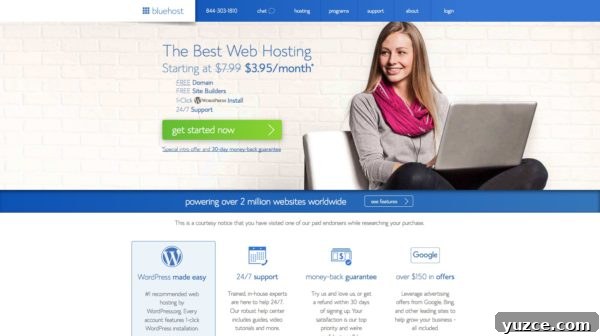
Once you’ve chosen a name you can either start with a free hosted platform or purchase your own domain on a hosting provider. Free platforms like Blogger, Wix and WordPress.com are fine for casual recipe sharing. If you want control, customization and eventual monetization, a self-hosted site is the better choice.
If you decide to self-host, pick a reputable provider and register your domain through them. Many hosting plans include a free domain for the first year and offer one-click WordPress installs. For beginners, an affordable shared hosting plan is ideal; you can upgrade later as traffic grows.
After choosing a hosting provider follow their signup process: select a plan, enter your desired domain, create an account and complete payment. Hosting plans are often billed annually, so check the term length and renewal price before purchasing. Consider adding domain privacy protection to keep your personal details private in public WHOIS records.
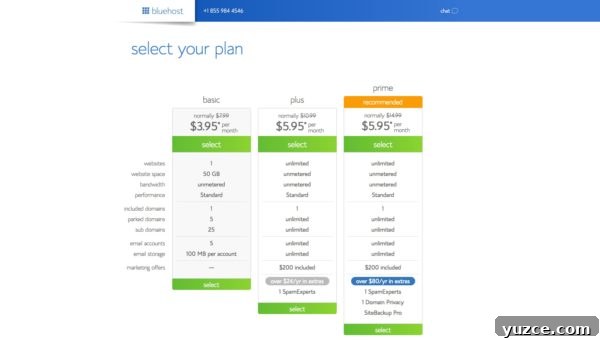
Select Your Plan
Most hosts offer tiered plans. If you’re experimenting, start with the basic plan and upgrade as needed. If you have long-term plans and expect growth, a mid-tier plan provides extra storage, performance and features that save headaches later.
Select the plan that fits your budget and future needs.
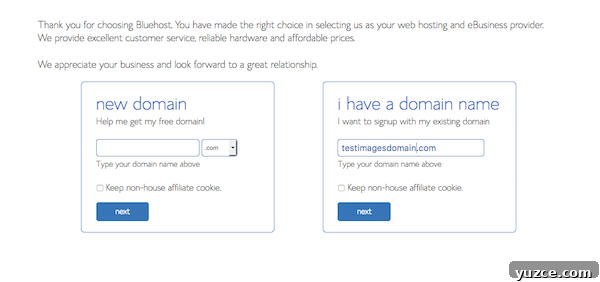
Choose Your Domain
Enter the domain name you chose during signup. If you already own a domain, follow your host’s transfer instructions. Using a .com extension remains a sensible default because it’s familiar and trusted by many users.
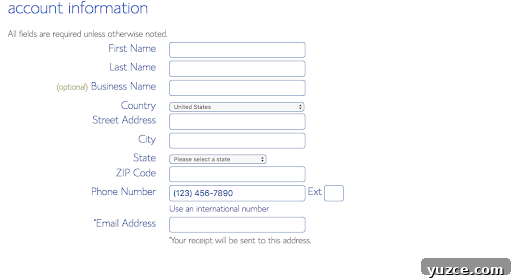
Enter Your Account Information
Create an email account dedicated to your blog. Use it for hosting communications, password recovery and official correspondence.
Choose Your Hosting Package
Choose a term length and package that match your budget. Hosting is typically paid annually, with discounts for multi-year commitments. If you’re unsure, a 12-month plan is a safe starting point—you can always upgrade later.
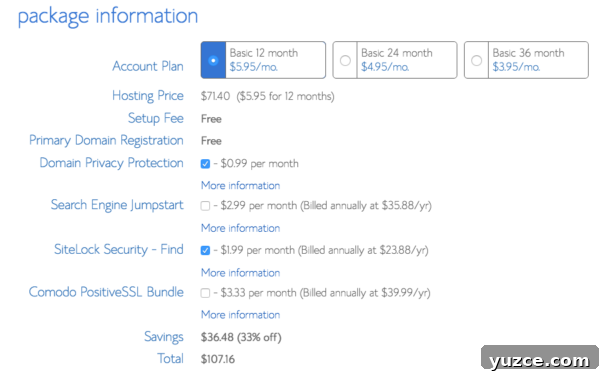
Consider add-ons: domain privacy is useful for protecting your personal data. Other extras are optional depending on your needs.
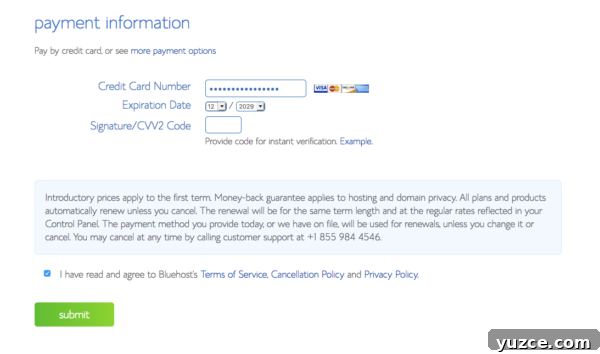
Enter Your Payment Information
Complete your payment details, review the terms and confirm your purchase. After payment you’ll receive a welcome email with important account details. Save that information securely.
Check Your Email
After purchase you should receive an email containing your account and FTP information. Follow the instructions to set your password and complete setup. Keep these details in a safe place, as you’ll need them to manage your site.
Now it’s time to install WordPress!
Step 3: Install WordPress
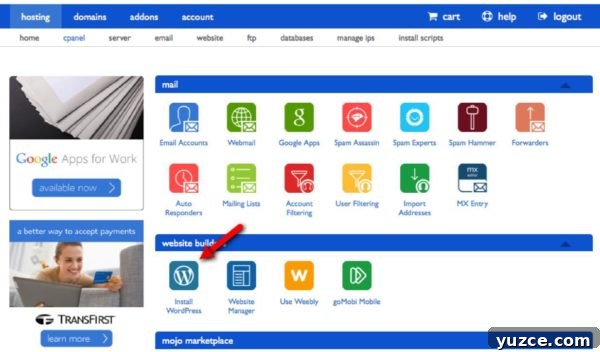
Once you’ve logged into your host’s control panel, look for a one-click installer or a section labeled “Website” where WordPress installation is offered. Click to install WordPress and follow the prompts.
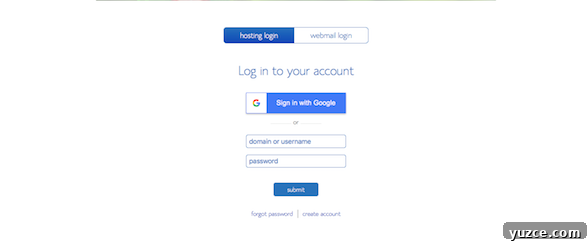
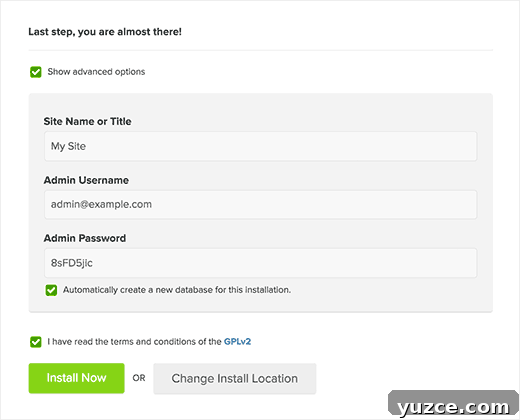
Select “Install WordPress,” choose the domain to install on and proceed to the installer. When prompted, use the advanced options to enter your site name, admin username, password and email. Choose a strong admin username and password to protect your dashboard.
Click Install and wait for confirmation. You’ll receive an email with your WordPress login URL and credentials—bookmark that URL and store credentials securely.
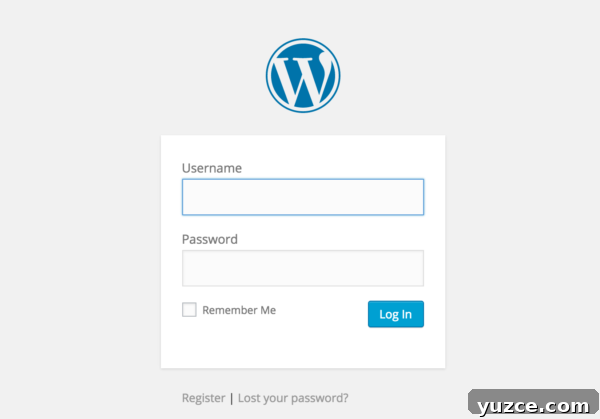
Log into your WordPress dashboard to begin customizing your site, creating posts and uploading images. The dashboard is where you’ll manage design, plugins, pages and posts.
CONGRATULATIONS, YOU NOW HAVE A SELF-HOSTED BLOG!
I’ll follow up with Part 2 where I cover site design, must-have plugins, copyright basics and ways to monetize your food blog.
- Designing your website
- The best plugins for food bloggers
- Copyright and disclaimers
- Ways to make money from your blog